
Excel time card calculator
Download a workbook that totals your hours, deducts unpaid breaks and estimates gross pay in Excel.
Updated
Weekly and biweekly time cards
Editable Excel formulas, unpaid breaks, overnight shifts and optional weekly overtime.
Download the Excel workbook .xlsx file. Free. No account. No ads. No macros.- Weekly
- 7 daily entries
- Biweekly
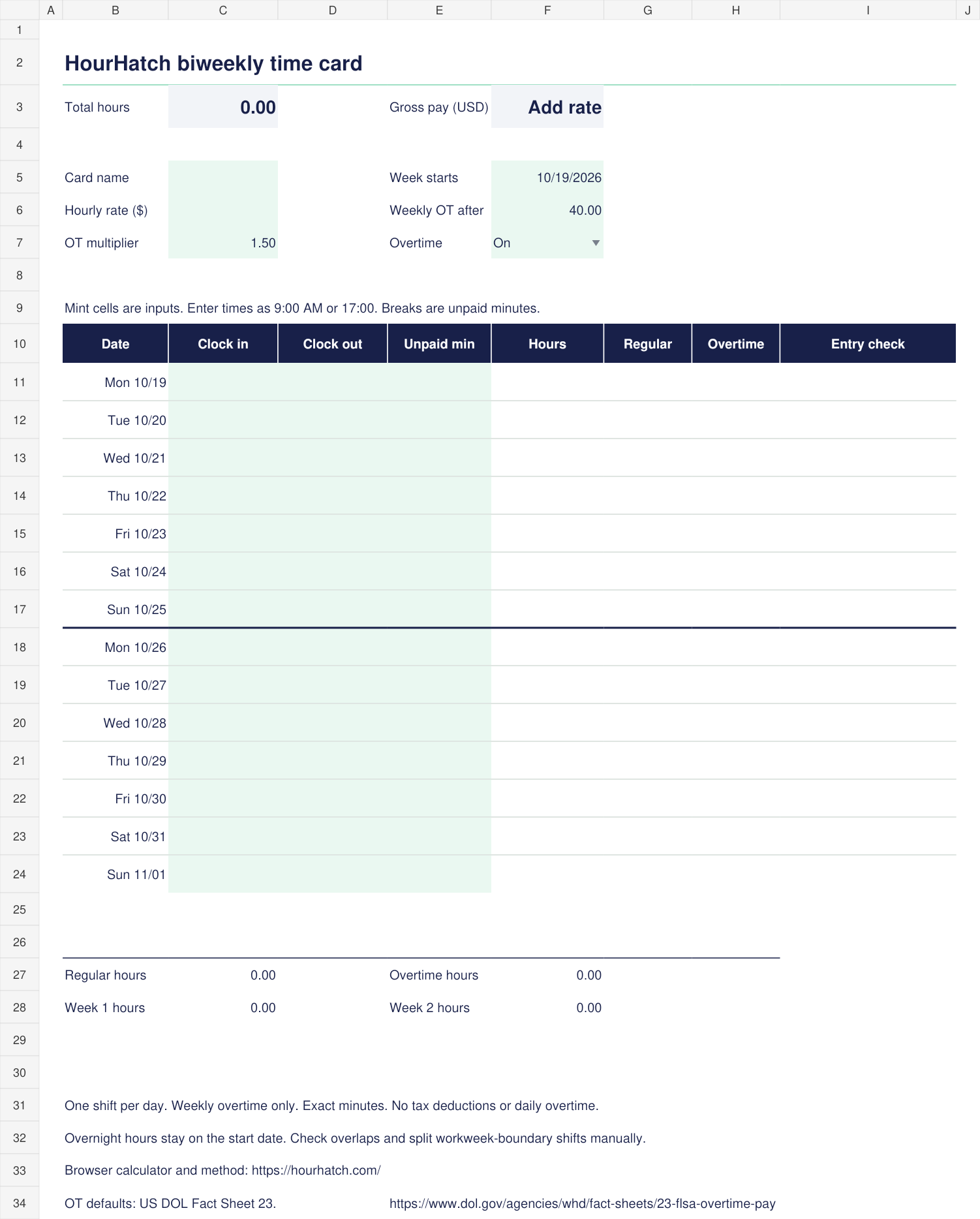
- 14 daily entries, with overtime calculated separately for each workweek
- Inputs
- One clock-in/out pair and unpaid break minutes per day
- Results
- Decimal hours, regular/overtime hours and optional gross pay
How do I use the Excel time card calculator?
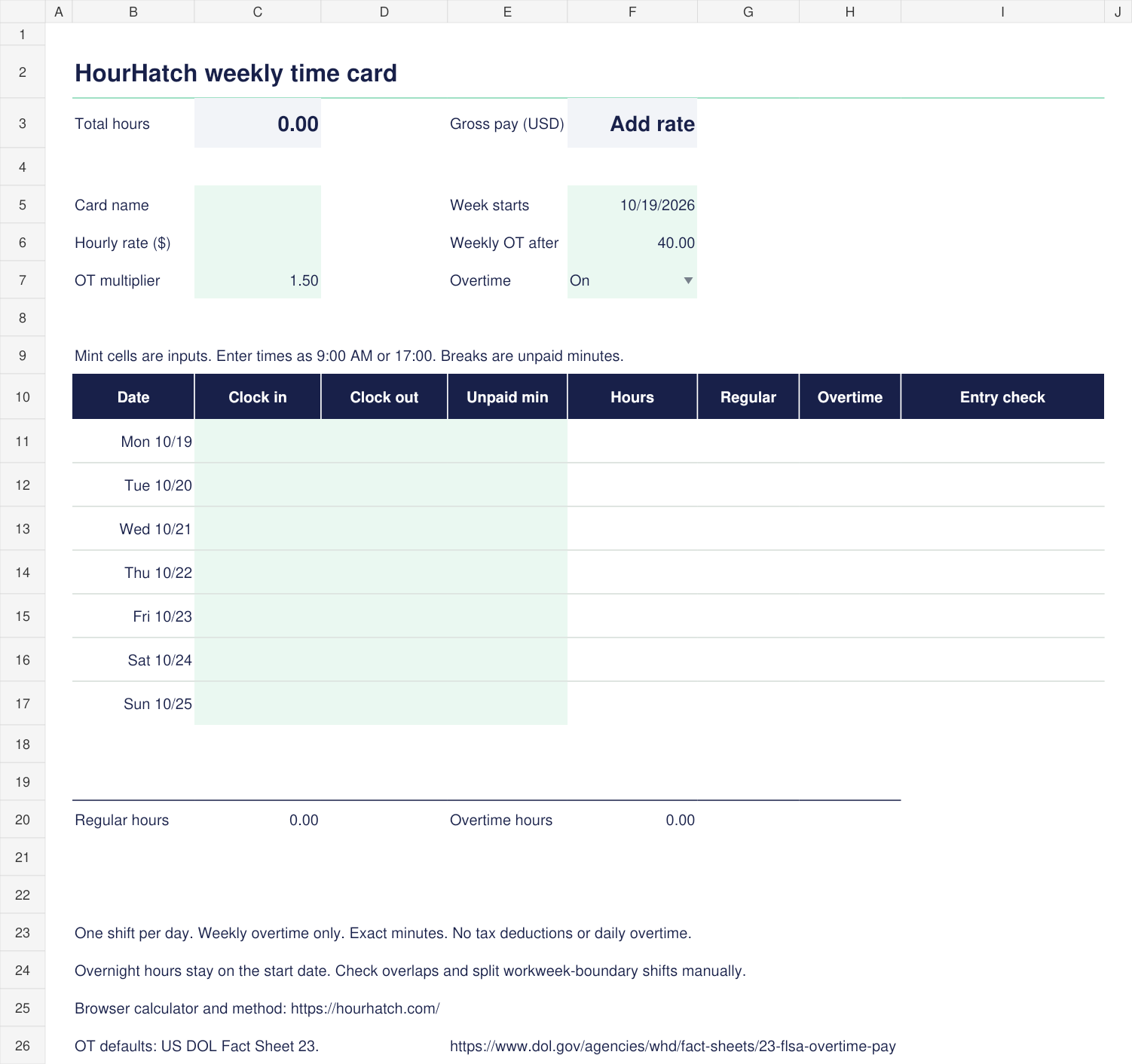
Open the workbook, choose Weekly or Biweekly, and enter your shift times in the mint cells.
- Set the workweek start date and an optional card name.
- Enter clock-in and clock-out as Excel time values, such as 9:00 AM or 17:00.
- Enter unpaid break minutes. Leave days off blank.
- Keep the default weekly overtime rule or adjust its threshold, multiplier or On/Off setting.
- Add an hourly rate if you want a gross-pay estimate.
Hours and pay recalculate from the entries. A missing time or invalid break is identified in the Entry check column, and the main totals ask you to check entries rather than present an incomplete total as final. A missing or invalid workweek date shows a warning next to Week starts; correct it before printing a dated record.
Which formulas calculate the hours?
Each completed day's hours equal the time between clock-in and clock-out, less unpaid break minutes.
For a valid completed row, the core formula is =ROUND(MOD(D11-C11,1)*1440,0)/60-E11/60, where C11 is clock-in, D11 is clock-out and E11 is unpaid minutes. The full workbook formulas also check incomplete or invalid entries before including them in the totals. The MOD function carries an earlier clock-out time into the following day. Use whole-minute times; split a full 24-hour period into dated entries with different start and end times.
Weekly regular hours are allocated up to the selected threshold, and hours beyond it are overtime. The biweekly sheet resets that threshold for its second seven-day workweek. Gross pay is regular hours times the hourly rate, plus overtime hours times the rate and multiplier.
The default 40-hour threshold and 1.5 multiplier reflect the general federal overtime rule for covered, nonexempt workers. They are editable calculation inputs. US Department of Labor overtime guidance explains the general rule.
What is included in the download?
The single .xlsx file contains a blank weekly worksheet and a blank biweekly worksheet, with formulas already in place.
Mint cells identify editable inputs. Hours and pay remain calculated values with number formats applied. No macros, account connection or external data refresh is required. Change the example workweek date to your own dates before keeping or printing a record.
The workbook was recalculated and checked during preparation. Native application behavior should still be checked in the spreadsheet application you use, particularly after editing formulas or importing the file into another service.
Does the workbook include every browser-calculator feature?
The workbook provides one shift per day and a simple weekly overtime calculation.
It does not calculate daily overtime, split shifts, tax deductions, tiered double time or multiple pay rates. Overnight time stays on its start date. Check adjacent overnight shifts for overlaps, and split workweek-boundary shifts manually so hours belong to the correct workweek.
For multiple clock-in/out periods, daily overtime settings or punch rounding, use the browser time card calculator. For a predicted finishing time, use the clock-out calculator.
Can I print the time card?
Yes, print the worksheet from your spreadsheet application's print menu after checking the entries and dates.
Use its scaling and page-orientation settings to fit the sheet to your paper. The browser calculator also provides a dedicated Print / Save PDF view for completed cards.
If a formula or result looks wrong, send a sample through the correction checklist.